Your product.
Build the next feature with Claude Code and Codex beside your editor and app preview.
Claude CodeCodexIDE
 armadai
Download
armadai
Download
Build in parallel Keep the whole picture
Run Claude Code and Codex in separate project workspaces. Keep your agents, code, and previews in view — without switching tabs.
macOS 14+ / Apple Silicon + Intel
7-day trial on either plan · Monthly or annual billing
Your app. The client project. The next idea. Give each its own workspace, then bring them together on the same canvas.
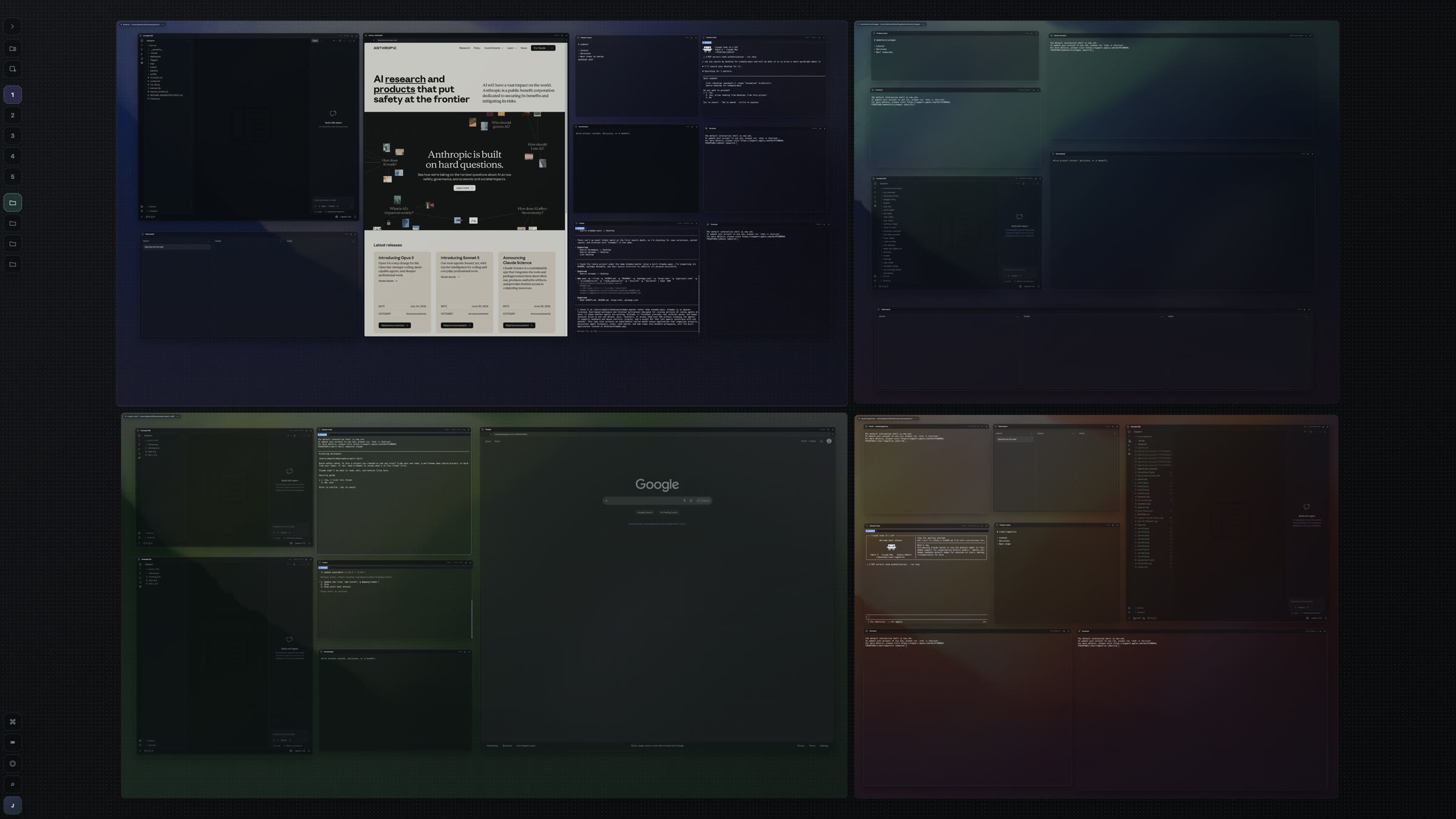
One canvas. A complete development environment.
Stop hunting through terminals. See who’s working, who’s idle, and who’s waiting — across all your projects.
Hover a waiting session, review the request, and approve right from the sidebar. Your canvas stays right where you left it.
ArmadaiPure blackBuild the new project dashboard.
Reading the project…
Reviewed the existing components
Updated the dashboard layout
Working on the finishing touches
Polish the dashboard.
Keep the first view simple.
Run the checks for the new client dashboard.
The agent is asking to run:
npm test

Folder: ~/Projects/tidal
Review the request from the sidebar, or continue in the session when you need more context.
Review an agent’s request without leaving the workspace in view.
01Spot the pause.Working, idle, or needs approval. See the status beside each session.
02Approve in place.Hover the waiting agent and choose a response from its menu.
03Keep your focus.No searching for the right terminal. No rearranging your canvas.
Choices depend on the agent and request. If a prompt needs more context or isn’t supported in the sidebar, open its session directly.
INFINITE CANVASAdd your tools. Move them anywhere. Draw between ideas.
[ A simplified demonstration, not the actual Armadai app. The full app includes many more features and tools. ]
Add a workspace. Fill it with tools. Open another beside it.
Drag workspace names to move projects · Drag tile headers to arrange tools · ⌘/Ctrl + scroll to zoomDrag workspace names or tile headers · Use Hand to pan
Nothing to set up. Just play.Simplified tool examples. No commands, agent runs, or live websites. Everything clears on reload.
Let an agent work on your product while you move a client project forward. Open the next idea beside them. Each project keeps its own tools and context, on the same canvas.
Build the next feature with Claude Code and Codex beside your editor and app preview.
Keep the brief, implementation, and browser together. Pick up the project without hunting for its windows.
Try a prototype in its own space while the other projects stay open around you.
For builders with more than one thing going
Independent developers. Freelancers. Small teams. Anyone balancing a product, client work, and the ideas they want to bring to life.
The agent conversation is only part of the work. Put everything else beside it, in a layout that stays yours.
Run agents in real terminals or a structured Codex Agent tile. Keep the full IDE alongside them, in the same workspace.
Open your browser preview, notes, and task boards beside the work they belong to. No hunting through a row of tabs.
Arrange tiles freely or snap them to a grid. Give workspaces their own backgrounds. Your saved layout brings you back to familiar ground.
Your familiar tools. One native macOS app.
Edit code, search your project, and review source control beside your agents. Keep the editor in its own tile on the canvas.
Keep localhost, docs, and research in browser tiles. Pin the pages you use, reorder tabs, and restore a tab you closed.
Plan with boards, backlogs, sprints, and calendars. Track dependencies and checklists beside the project they belong to.
Sketch a flow or leave a label directly on the canvas. Add drawings to a workspace and they move with the project.
Store secret values in macOS Keychain. Scope environment variables to the app, a canvas, or one workspace.
Enable the session helper and choose Keep Running and Quit to leave terminals and CLI agents working.
Codex Agent and IDE tiles close with the app.
Alongside your agents and notes.
Press ⌘K to open a tool, run a command, or jump straight to an existing tile on your canvas. Type a few letters. Choose your next move.
Start an agent. Find a terminal. Open drawing tools.
Keep your hands on the keyboard.
Open a new Codex tile, or focus the one already on your canvas.
A PLACE FOR EVERY PROJECT
Your folders become workspaces. Your workspaces live on canvases. Build a setup that makes sense to you, then come back to it.
CANVAS / 01
CANVAS / 02
Choose an existing folder, or create a new one inside Armadai. Each workspace starts blank so you can add the agents and tools you need.
Keep projects together on one canvas, or create separate canvases for your product, client work, and experiments.
Move and resize tiles freely, or arrange them in grids and rows. Give each workspace a layout that fits the work.
Clear a workspace off the canvas when you’re done. Reopen it with its saved tiles and layout when you need it again.
YOUR WORK. YOUR ATMOSPHERE.
Choose a canvas theme. Give each workspace its own image. Adjust transparency until everything feels right.

~/projects/orbit
❯ npm run dev
Ready to build.
Local localhost:3000
A little space to focus.
❯
THE NEXT IDEA
A familiar place for
the next big thing.
FROM YOUR FILES TO YOUR WORKFLOW
Drag files from Finder into a terminal tile. Use them in a command or a prompt for Claude Code or Codex CLI, without typing the full path.
Drop one file or several. Names with spaces are handled automatically. You choose when to press Enter.
cat '/Users/you/Documents/Project brief.md'The path lands at your cursor, ready for your next command.
OPTIONAL TERMINAL RECORDING
Save terminal output from your builds and CLI agent sessions locally on your Mac. Turn recording on from the REC menu or Settings when you want a record of the work.
Off by default. The recording setting applies across terminal sessions.
Choose what stays. Set a retention window and a disk limit. Older recordings are cleaned up first.
Manage the files. Export individual recordings, delete one, or clear the whole collection in Settings.
Terminal output · Local storage
Default limits shown. Adjust them in Settings.
Recorded output can include sensitive information printed by your tools.
Turn a task into work for Claude Code or Codex. Armadai gives each run its own Git worktree and tracks it through to review.
FIVE VIEWS / ONE BOARD
Move from the big picture to the details without leaving your project. Organize the work here, then hand a clear task to an agent.
The same tasks, seen from different angles.
Search and filters carry across every view.
Find a project by its name.
Keep subtasks, labels, comments, and file references with the work.
Boards are stored locally with your canvas.
Undo and redo board changes during your current app session.
Export a board as JSON. Import a saved board to replace the current one.
Find a project by its name.
Put the brief and what “done” means on the board. Choose the agent you want to run it.
Armadai starts an agent if needed, prepares the worktree, and keeps the task’s progress on the board.
Inspect the changes and the work behind them. Request changes or approve the result before merging.
Optional / Auto-run Ready tasks
Let available agents pick up Ready tasks, with limits on simultaneous runs and checks for overlapping work. Pull requests still wait for your review.
DRAFT PULL REQUESTS WITH CONTEXT
Build a draft GitHub pull request with your changes and available records of the work. Review the diff and generated description before you publish.
Find Publish provenance PR… in Armadai’s worktree menu. Requires a GitHub repository and an authenticated GitHub CLI.
Add project search
src/search.tstests/search.test.tsnpm testexit 0 · last recorded runCommand history and available terminal output, alongside the changes.
Your confirmation comes before publication.
Evidence reflects what was recorded. Terminal command detail depends on the session’s available data.
Follow the conversation, approve actions, and inspect file changes in Armadai’s Codex Agent tile. Keep the decisions beside the work.
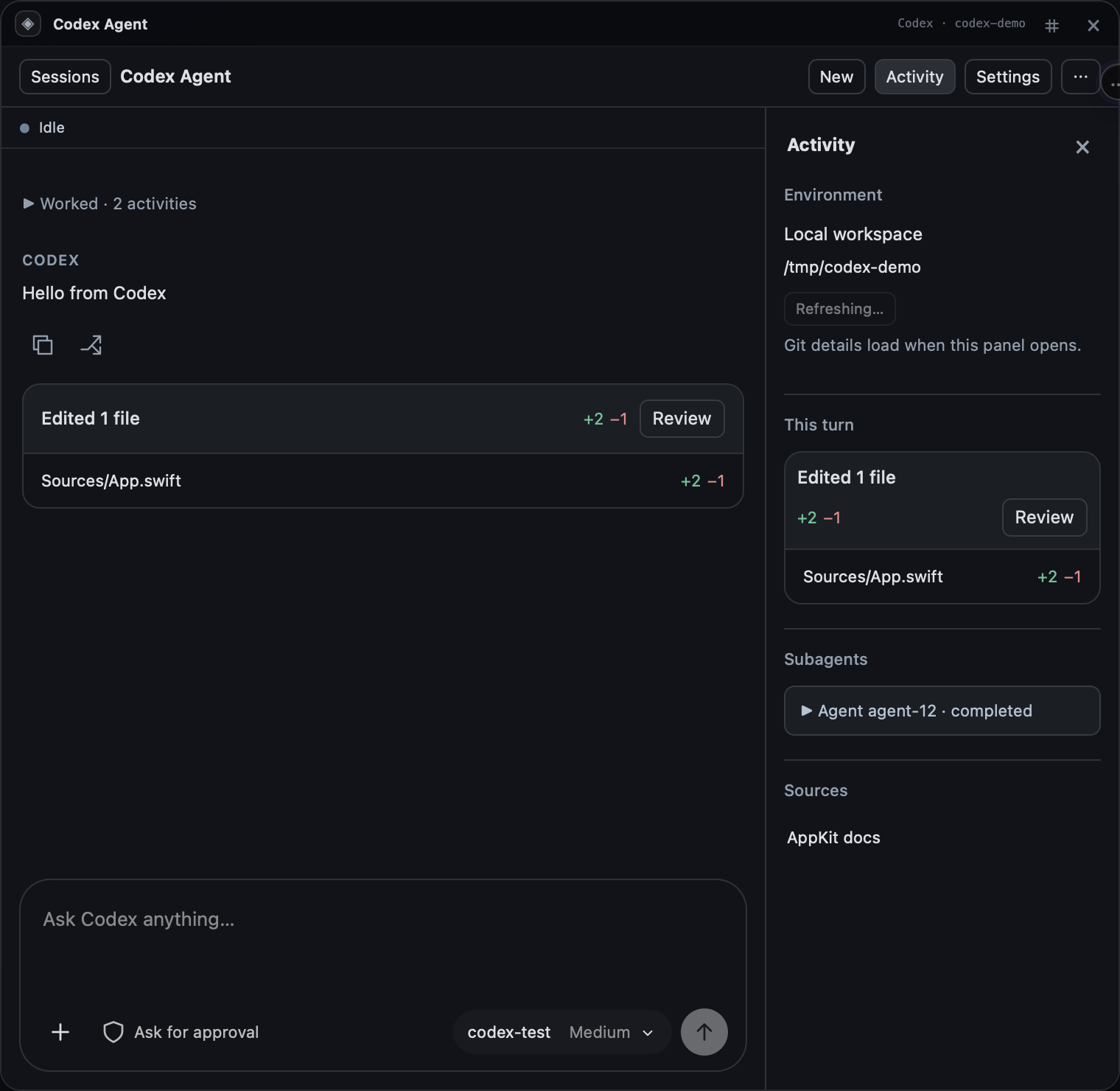
Changed files sit beneath the response. Open Review in Armadai to inspect the diff.
Keep Git close, too.
Review working or staged changes, stage files, commit, and confirm a push — all from the Codex Agent tile.
Give Claude Code and Codex a shared goal inside a project. Coordinate lets them exchange plans, implementation, and reviews — while you set the boundaries.
Plan. Build. Review.
Build. Question. Refine.
Review and edit messages before delivery, or choose Auto to keep the conversation moving.
Set a message budget. Inspect the transcript. Stop the connection whenever you need to.
The coordination layer and transcript stay local. Your agents use their own accounts.
Unlimited workspaces. Unlimited agents.
Every Armadai tool, on either plan.
$20/ month
Room to build, one month at a time.
Download to start trialThen $20 USD/month. Payment method required. Cancel anytime.
$120/ year
$10/month equivalent. Save $120 vs. $240 paying monthly.
Download to start trial7 days free, then $120 USD/year. Payment method required. 30-day money-back guarantee after payment.
Trials are for eligible new subscribers. Cancel before your trial ends to avoid the first charge. Plans cover the Armadai app. Claude Code, Codex, and other third-party services may require separate accounts or subscriptions. Your Mac’s resources and provider usage limits still apply.
Armadai is a native macOS app for working across multiple projects on an infinite canvas. Each project folder becomes its own workspace, with its own agents, terminals, code, browser, notes, and tasks. Zoom out to see the whole picture, then move into the project you want to work on.
Download Armadai, verify your email, and choose a plan. Open an existing project folder or create a new workspace folder inside the app. Your workspace starts blank. Install and sign in to the agent tools you want to use, then add them beside your project.
Yes. Open multiple project folders as workspaces on the same canvas, and run multiple agents in each workspace. Your Armadai plan does not limit the number of workspaces or agents. Your Mac’s resources and your agent providers’ usage limits still apply.
Armadai gives your installed agents a place to work and collaborate. You use your own Claude Code and Codex accounts. Their usage and subscriptions are separate from your Armadai plan.
Yes. Open Hand-off on a task board and choose Run with Claude or Run with Codex. Armadai starts an agent if needed, gives the run its own Git worktree, and tracks the task through to review. Successful work comes back as a draft pull request for human review. Auto-run Ready tasks is optional and uses limits on simultaneous runs and checks for overlapping work.
Codex CLI runs in a terminal tile. Codex Agent gives you a chat-style tile with streamed responses, approval controls, file-change review, and saved conversations. Both use your installed Codex and your own account. Choose the interface that fits how you want to work.
Armadai supports Apple Silicon and Intel Macs running macOS 14 or later. The download includes support for both architectures.
Download Armadai, create an account, and choose either plan. Eligible new subscribers get 7 days free with a payment method required. After the trial, Pro Monthly is $20/month or Pro Annual is $120/year — 50% less than paying monthly for a year. Cancel before the trial ends to avoid the first charge. Annual payments also have a 30-day money-back guarantee.
Enable the background session helper in Settings Sessions, then choose Keep Running and Quit to leave terminals and CLI agents running. Reopen Armadai to reconnect to those sessions. Codex Agent and IDE tiles close with the app; sessions do not survive logging out or shutting down your Mac.
Your canvas layouts, notes, and task boards are stored locally. Agents, browser pages, IDE extensions, account checks, and GitHub publishing can use online services. Environment Vault stores secret values in macOS Keychain and passes selected variables to the tools you run.
The installed app checks for updates automatically by default and lets you know when one is available. You can enable background downloads in Settings or download an update when you’re ready. Installation waits until you choose Restart & Update, so you decide when to restart.
Your projects. Your agents. Your canvas.
APPLE SILICON + INTEL / macOS 14+
 armadai